The booth runs the party. You run the booths.
Built by a photographer, for photographers who want control over their booths.
FunBooth takes the photos and prints them, even without internet. With a connection, guests get their picture by QR code or email. From your phone you see every booth live, get told when the paper runs low, and fix things without walking over.
Everything a guest touches
The booth app is a Windows program built for a touch screen. Photos and prints keep going when the venue's Wi-Fi gives up.
Photo, GIF, boomerang, video
Guests pick the mode on the start screen. Canon cameras are controlled directly; a webcam works too.
Guests never wait
The next guest can start while the last photos are still being processed and printed.
The picture on their phone
A QR code on the sharing screen, or the picture by email. No app for the guest to install.
AI background removal
Runs on the booth's own graphics card, with a live preview while guests pose. No cloud, no green screen.
Design it with your finger
Screens and print layouts are edited by touch on the booth: drag, resize, change a picture, set the colours.
Copies while it runs
Photos go to a USB drive during the event, and the booth makes its own backups.
It asks the printer, not just sends to it
Sending a print is easy. Knowing what the printer is doing is the hard part. FunBooth talks to the DNP printer directly, so you know what's happening before a guest is left waiting for a print that never comes.
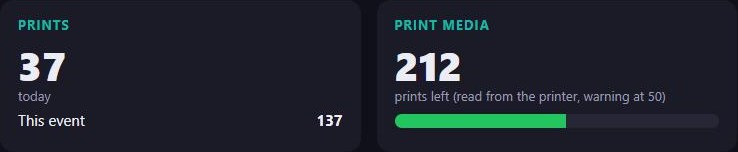
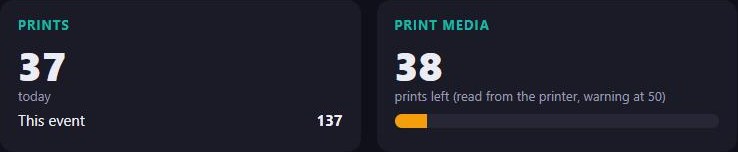
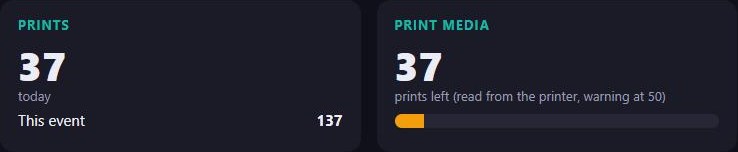
- The real number of prints left. Counted by the printer itself. No guessing needed.
- Paper low, paper out, paper errors. Each one by its own name, the moment the printer reports it.
- On your phone and in your mail. The warning reaches you wherever you are, with the booth's name on it.



Faces stay right when the sun goes down
Outdoor light changes all evening. FunBooth keeps watching how your guests look in their photos, and corrects the camera itself, gradually.
- It corrects itself gradually. Small steps, so guests never notice a jump.
- Extra alert at sunset. When the light changes fastest, it pays extra attention.
- It tells you when it needs you. A message on your phone.
Be at every booth at once
Each booth reports to your server. Open the dashboard, or install it as an app on your phone, and you're standing next to it.
- Live view of the screen.
- Tap on it from far away. Help a guest or change a setting without walking over.
- Start, switch, shut down. Launch the event, switch to another event, restart or shut down the booth.
- Told before guests notice. Printer, camera and connection problems on your phone and by email.
Change the booth from your browser
Each booth's settings menu is on the dashboard too, with the same pages, labels and limits as on the booth.
- The booth's own settings. Screen light, printer offsets, camera, USB export. The booth applies them between guests.
- The event's settings. Capture modes, countdowns, sharing, print limits and every guest text. Booths download the new version by themselves.
- The design editor. Move, resize and restyle the screens and print layouts in the browser.
Capture settings
Photo
GIF
Language & texts
Welcome screen
General
Screen light
One place for every booth and every event
All your booths and events on one website, on your laptop or your phone.
- Events travel between booths. Design an event once, and every booth can use it.
- See how the night went. Sessions per booth as a chart, and everything that happened in its timeline.
Every booth at a glance
Online or not, which event is running, prints left and the latest guest photos, per booth.
The story of the night
A timeline per booth: sessions, prints, problems and when they were fixed.
All your events
Every event with a preview. Download it, or put it on a booth.
Guests get their mail
The photo by email. When a guest replies, it comes back to you.
An app on your phone
Install the dashboard on your phone's home screen, with notifications.
Two-factor sign-in
Your account protected with an authenticator app or a passkey.
For when you're the photographer
Shoot with your own camera; the screen at the venue shows each picture's QR code a moment later.
You take the shot
The picture goes to the server straight away.
The QR code appears
On any screen with a browser, signed in once. Each photo gets its own number.
The guest scans it
The code leaves the screen as soon as it is scanned, ready for the next one.
You see who got theirs
Every photo shows whether it was opened and downloaded. Missed one? Show it again.
Ready when the doors open
Set up the booth once, then watch the whole night from your pocket.