What makes FunBooth different
Taking photos and printing them, every booth can do. These are the things that let you run more booths, with fewer surprises and less walking.
Real-time printer status
Paper left, paper low, door open, errors: straight from the printer, in real time. Real numbers, no guesses.
Read more ↓Automatic exposure
Faces stay right from daylight to the dance floor. The booth corrects itself, gradually, and is extra alert at sunset.
Read more ↓Screen light
The booth's own screen lights up your guests during the photo, and helps the camera focus in a dark room.
Read more ↓Live view & remote control
See the booth's screen on your phone, live, and tap for a guest who is stuck. Protected with the booth's PIN.
Read more ↓Everything from your phone
Every setting and the full design editor, in the same place as on the booth. Change a design on the way to the event.
Read more ↓All your booths at once
One screen with every booth that is out: online or not, the event, sessions, prints and paper left, and one combined log.
Read more ↓Detailed notifications
Paper low, a printer or camera problem, a booth offline: on your phone and by email, and again when it is solved.
Read more ↓Works offline, syncs when it can
The booth runs the whole event without internet. Designs, photos and logs sync by themselves when there is a connection.
Read more ↓AI background removal
Any background behind your guests, without a green screen. The AI runs on the booth itself; a classic green screen works too.
Read more ↓Real-time printer status
Sending a print is easy. Knowing what the printer is doing is the hard part. FunBooth talks to your DNP printer directly, so you know what is happening before a guest is left waiting for a print that never comes.
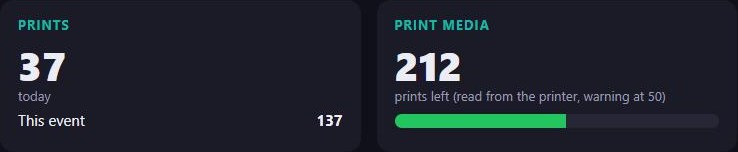

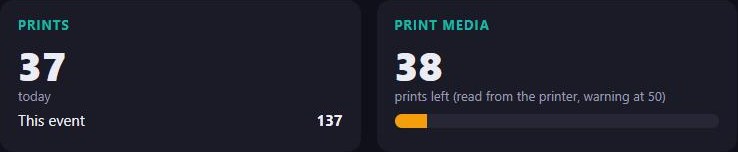

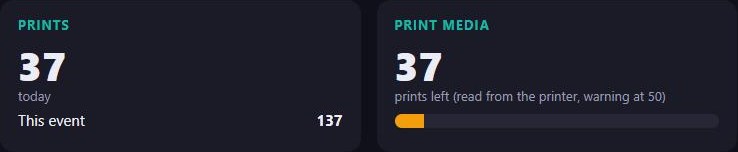

Real numbers, no guesses
Windows only knows whether a print job is in the queue. FunBooth asks the printer itself: how many prints are left on the roll, and what it is doing right now. That is shown on the booth, on the dashboard and on your phone, updated in real time.
- The real number of prints leftCounted by the printer itself, so you know when to change the roll.
- A warning before it runs outYou choose at how many prints left; the booth and your phone tell you in time.
- Every problem by its own nameCover open, paper end, ribbon end, a paper jam: you know what to bring before you walk over.
- Other printers tooEnter the number of prints on the roll, and the booth counts them down for you. Direct support for more printers will follow.
Automatic exposure
Light changes all evening: the sun goes down, the venue dims the lights, the DJ starts. FunBooth keeps watching how your guests look in their photos and corrects the camera itself, gradually, so the last photo of the night looks as good as the first.
Your booth keeps an eye on the light
Most booths keep one camera setting for the whole night. FunBooth keeps adjusting.
Extra alert when the light changes fastest
Around sunset the light outside changes by the minute. That is exactly when FunBooth pays extra attention, and keeps the faces on target while the room gets darker.
Prefer fixed settings? Switch exposure by time of day: one set for the afternoon, another for the evening.
The settings, as they are named in the booth
Every setting can also be changed from the dashboard, while the booth is running.
- Person brightnessHow bright faces should be: a little darker or brighter, to your taste.
- Highest ISOThe limit the booth may use, so photos never get too noisy.
- Largest step per checkFrom 1/3 stop to 1 stop: small steps that guests never notice.
- Notify me when the exposure is not rightA message on your phone when it cannot fix it alone.
Screen light
The booth's own screen becomes a soft light for your guests during the photo, and helps the camera focus in a dark room.
The screen lights up your guests
During the countdown and the photo, the booth's own screen becomes a soft light: bright bars left and right of the live view, and the screen at full brightness. Faces get more light, and the camera focuses faster and surer in a dark room.
You choose how much of the screen becomes light: a narrow strip, a wide band, and its colour, from warm to pure white.
Between photos the screen goes back to its normal brightness*, so it never blinds anyone waiting in line.
* On compatible displays.
Live view & remote control
See exactly what the guest sees, on your phone, live. And when a guest is stuck, tap for them.
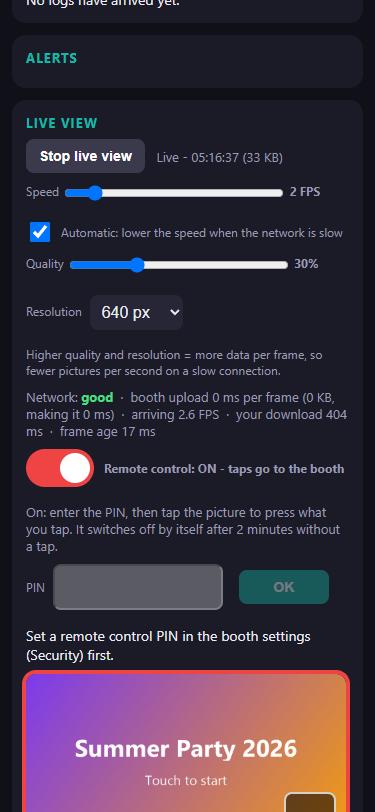
See what the guest sees, and tap for them
Open the live view and the booth's screen is on your phone, live. Switch on remote control, enter the booth's PIN, and your taps go to the booth: start a session, close a screen, help a guest who is stuck.
- Adjusts itself to a slow connection
- Only when the booth allows it, and only with its PIN
- Switches off by itself after 2 minutes without a tap
Everything from your phone
Every setting and the full design editor, in the same place as on the booth. Change a design on the way to the event.
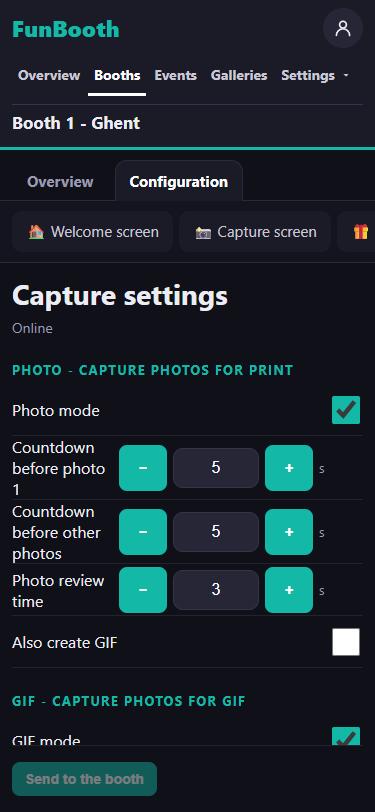
Change the booth from wherever you are
The same settings as on the booth itself, in the same place: countdowns, photo, GIF and video modes, printing, sharing, the lock screen, texts and languages. Send them to the booth and it uses them right away.
- Every page of the booth's settings, also on a phone
- Security settings stay on the booth
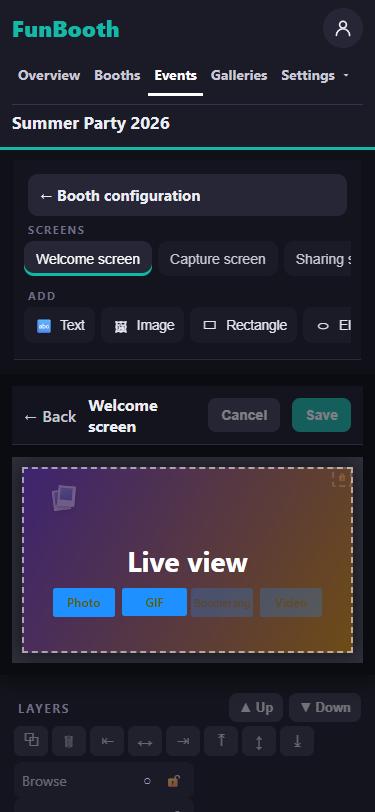
Fix a design on the way to the event
The welcome screen, the capture screen, the sharing screen and the print layouts, in the same editor as in the app. Move a button, change a text, add your client's logo from your phone's photos.
- Every booth of the event gets the new design at its next sync
- Start a new print layout from the default templates
All your booths at once
One screen with every booth that is out tonight.
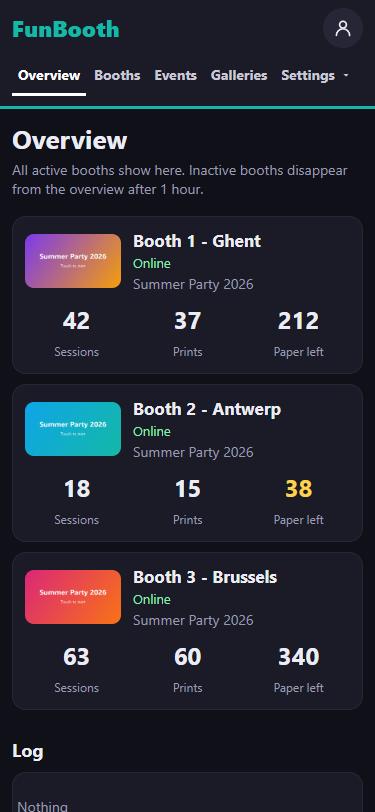
All your booths at a glance
Is it online, which event runs, how many sessions and prints so far, and how much paper is left: for every booth, on one screen.
- Paper running low turns yellow before it runs out
- A booth that goes offline says so, with how long
- One combined log of all your booths below
Detailed notifications
Know it before your client does.
A message the moment a booth needs you
Paper almost out, a printer problem, a camera that stopped, a booth that went offline: your phone tells you right away, with the booth's name and the problem. And again when it is solved.
- Straight to your phone, also when the dashboard is closed
- By email as well, if you want
- You choose which messages you get
Works offline, syncs when it can
No internet at the venue? The booth does not care.
The booth runs the whole event without internet: sessions, prints, everything. When there is a connection, events, designs, photos and logs sync by themselves, in both directions.
- Nothing is lostEverything stays on the booth until the server has it.
- Several booths, one eventChange the event once; every booth of it gets the change.
AI background removal
Any background behind your guests, without a green screen.
The AI runs on the booth itself, on its own graphics card: no cloud, no upload, no waiting for a server. Prefer the classic way? A green screen works too.